
I walked into a renovated open-plan home last season and noticed the TV was perched on a bookshelf, with cables snaking across the floor toward the entertainment console. The setup worked, but it felt cluttered and temporary. That corner held three missed opportunities: poor cable management, inflexible viewing angles, and wasted floor space.
The pattern shows up in lounges, outdoor entertaining areas, and home studios across Australia. As more Australians embrace flexible living spaces, with 37 percent regularly working or entertaining from home, the way we position screens and manage media has become central to both aesthetics and functionality.
Smart storage and display placement isn’t just about tidiness. It’s about creating spaces that support the way you actually live. When you zone your entertainment areas thoughtfully, manage cables properly, invest in flexible display solutions, and keep your setup fresh, you create rooms that feel spacious, safe, and inviting.
What Smart Home Entertainment Spaces Look Like
Smart home entertainment spaces turn media storage and display from an afterthought into a system that enhances your daily life.
In practice, they combine fixed cabinetry, mobile equipment like a quality mobile TV stand, and simple organization that keeps your living areas clutter-free. That might include wall-mounted storage with integrated cable management, a mobile TV stand with lockable wheels for flexibility, media consoles with dedicated shelving, and thoughtful zones for gaming, streaming, or outdoor viewing.
Good placement matters just as much. It means positioning your TV at a comfortable viewing height, creating clear pathways through rooms, and designing storage that keeps remotes, devices, and cables where you need them without creating visual clutter.
Three Benefits of Smarter Home Entertainment Design
Investing in better storage and display solutions pays back in safety, convenience, and visual appeal.
Comfort and wellbeing come first. An ergonomic screen height reduces neck and eye strain during long viewing sessions. Good cable management eliminates trip hazards, especially important if you have children or pets. Clear zones around furniture and doorways make your space feel more open and safer to move through.
Convenience comes next. No more hunting for remotes, chargers, or HDMI cables. A mobile TV stand lets you reposition your screen for different activities, pull it forward for movie night, angle it for gaming, or move it outside for entertaining. Organised storage means every device has its place.
Visual appeal is the third gain. A thoughtfully designed entertainment space with proper cable management, matching storage, and a quality mobile display stand simply looks better. It creates a curated, intentional feel rather than a jumble of electronics.
How to Design Your Home Entertainment Zone
Start with decisions that are easy to live with and easy to adjust as your needs change.
Plan your viewing areas first. Determine your main viewing distance and angle. The entertainment industry recommends the screen centre sit at roughly eye level when you’re seated, tilted slightly downward. A mobile TV stand with adjustable VESA mounting gives you the flexibility to find the perfect height and angle for both seated viewing and standing interaction.
Map your cable routes. Run cables along skirting boards, through cable trays, or behind wall-mounted storage rather than across open floor. This eliminates trip hazards and creates a cleaner look. A mobile TV stand with integrated cable management channels keeps leads tidy and prevents tangling.
Create a dedicated media storage zone. Whether it’s a media console, wall-mounted cabinetry, or open shelving, keep streaming devices, soundbars, gaming equipment, and cables in one organised area. Label shelves or use drawer dividers so everything has a home.
Choose flexible display solutions. If your space needs to adapt, for movie nights, gaming sessions, or entertaining guests, a mobile TV stand with lockable castors lets you reposition your screen without permanent installation. Look for units with a wide, stable base and smooth-rolling wheels that work on both carpet and hard floors.
Standardise your connections. Use VESA mounting standards for screens and ensure your mobile stand accommodates your screen size and weight. Invest in a quality soundbar shelf so audio equipment sits at ear level, and add a secure device shelf for set-top boxes, gaming consoles, or streaming devices.
Storage Zones for Different Spaces
Different areas of your home call for different approaches.
Living and family rooms: Keep main TV storage built-in or wall-mounted, use a mobile stand only if you need flexibility, and leave clear paths to doors and main circulation routes.
Home studios and offices: Use wall shelving for equipment, ensure monitor height reduces strain, and keep cables routed away from walkways.
Outdoor entertaining areas: A mobile TV stand with lockable wheels is ideal for flexible positioning without permanent installation. Look for weatherproof materials and a sturdy base that won’t tip in windy conditions. Cable management becomes even more important outdoors, use outdoor-rated extension leads and secure cables away from foot traffic.
Games and media rooms: Mobile displays allow you to reposition screens for different gaming setups, movie configurations, or social viewing. Mount shelving for game consoles, controllers, and media at arm’s reach.
Bedrooms: Keep screens smaller and mounting minimal. If you use a mobile stand, ensure the base doesn’t block doorways and wheels lock securely on your flooring type.
Mobile Display Stands for Flexible Living
Mobile TV stands solve real problems that fixed installations can’t.
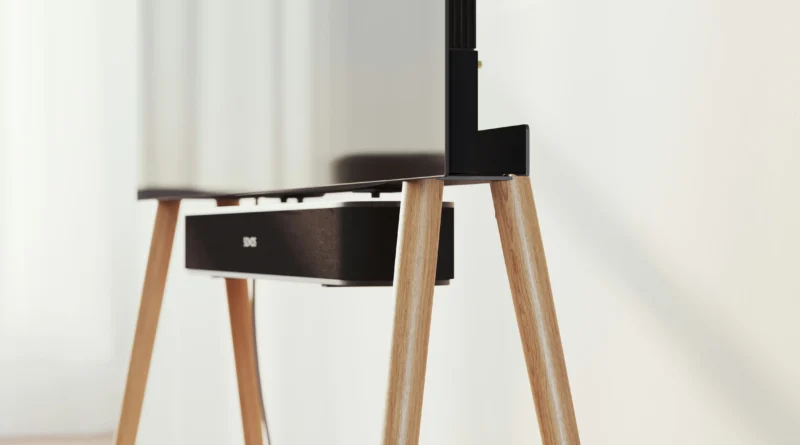
Most households eventually want flexibility, a screen that moves between rooms for entertaining, rotates to different angles, or comes out only when needed. A purpose-built mobile TV stand delivers that without the permanent commitment of wall mounting. Quality units feature a stable, wide base, smooth-rolling lockable castors that grip both carpet and hard floors, integrated cable channels to manage leads, and VESA mounting that adjusts for comfortable viewing height whether you’re sitting or standing.
When choosing a mobile stand, confirm it supports your screen size and weight, check that the wheel locks actually hold on your flooring, and look for a shelf suitable for soundbars or streaming devices. A secure device shelf prevents equipment from sliding when you move the stand across thresholds or through doorways.
Retail Display Direct offers a practical mobile TV stand with these features built in, making it ideal for homes that value both flexibility and polish.
Smart Organisation Keeps Your Space Fresh
Simple organisation habits keep your entertainment zone feeling intentional and clutter-free.
Label shelves and drawers so everyone in the household knows where things belong. Use cable tidies and clips to keep leads bundled and routed away from view.
Rotate seasonal equipment, move gaming gear to the front in winter, outdoor equipment forward in summer. Keep a charging station with multi-device capability so phones, tablets, and controllers are always ready.
If you entertain often, create a guest-ready setup: test all connections weekly, keep remotes easy to find, and ensure your sound system works reliably. Small habits like returning remotes to the same spot and tucking cables behind cabinetry make a real difference in how your space feels.
How to Measure Your Success
A great home entertainment space should feel effortless to use and easy on the eye.
Safety: No trip hazards from cables, secure furniture that won’t tip, clear pathways through the room.
Convenience: Quick setup for different activities, easy access to remotes and devices, minimal time searching for leads or adapters.
Aesthetics: Clean sightlines without visible cable clutter, organised storage that matches your décor, a TV position that feels intentional.
Flexibility: Ability to reconfigure for different uses, movie nights, gaming, entertaining, or working, without major effort.
Durability: Equipment that lasts, storage solutions that hold up to regular use, cables and connections that stay reliable.
Review your setup every season. If you’re constantly adjusting the screen height, hunting for cables, or moving equipment around, that’s a signal to reconsider your layout or invest in better storage.
Make Your Entertainment Space Work for You
Intentional design turns a random collection of electronics into a space you actually enjoy spending time in.
Start with your main viewing area and get the height and angle right. Then sort your cables and storage to match your daily habits. If flexibility matters, for entertaining, different family activities, or changing tastes, a quality mobile TV stand removes the commitment of permanent installation while keeping your space feeling curated.
The best home entertainment zones feel invisible when they work well. No one thinks about the setup; they just enjoy the experience.
FAQ
What’s the best viewing distance from a TV?
Most home theatre experts suggest sitting 1.5 to 2.5 times the screen width away. For a 55-inch TV, that’s roughly 2 to 2.5 metres. A mobile stand lets you experiment and find the distance that feels right for your space.
Can I use a mobile TV stand outdoors?
Yes, if you choose a weatherproof unit designed for outdoor use. Ensure the base is wide and stable, wheels lock securely, and you route cables safely away from wet areas. Bring the stand inside during heavy rain or extended wet weather.
How do I prevent cables from becoming a mess?
Use cable ties, clips, and management channels routed along skirting boards or behind cabinetry. Run cables from your TV down the back of the stand and along the wall rather than across open floor. Label each cable at both ends so you know what connects where.
What size mobile TV stand do I need?
Check the weight and size specs of your screen, then choose a stand rated for at least 10–15 percent above that weight. A wider base provides more stability, especially on carpet or uneven floors.
How often should I test my entertainment setup?
Test all connections and equipment weekly if you use the space daily, or before guests arrive if you entertain regularly. Replace any frayed cables and check that your mobile stand wheels lock properly on your specific flooring.
Should my TV be at eye level or slightly below?
Slightly below, roughly 15 to 20 degrees downward from your horizontal sightline when seated. This reduces neck strain during long viewing and feels more natural than looking up at the screen.